Dictating
Hold or tap
Pick your dictation key, and choose whether to hold it or tap it once to start and again to stop.
Voxy is driven by one key. You choose which key, and whether it works by holding or by tapping.
Both settings live in Settings → General → Dictation hotkey.
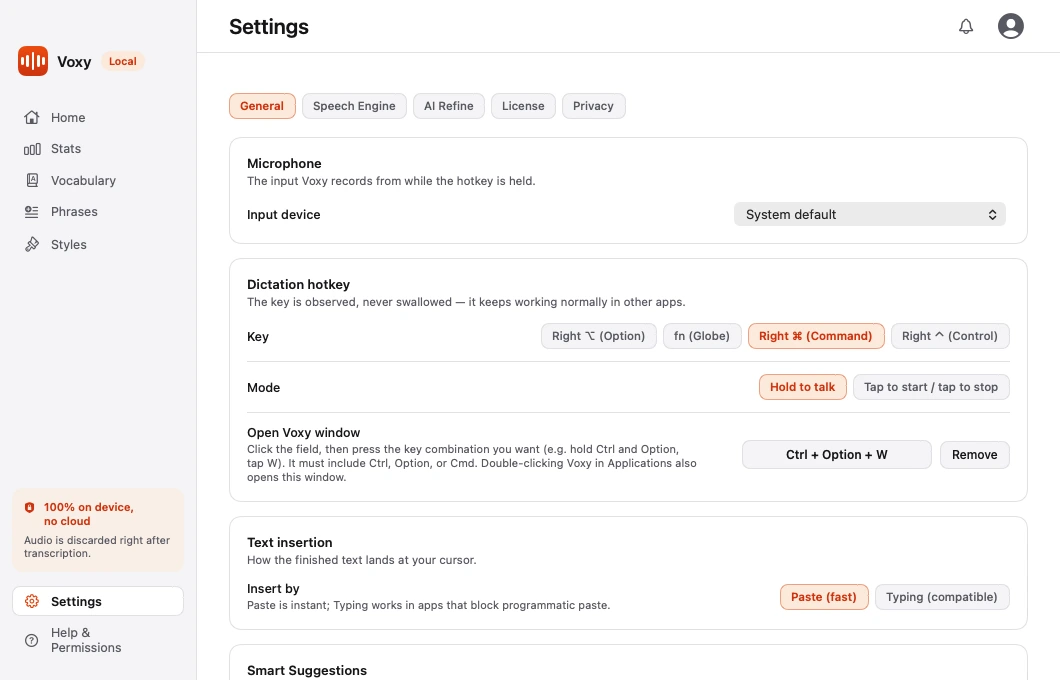
Choosing the key
The offered keys sit on the right of the keyboard, out of the way of normal typing. The list differs by platform, because the keyboards do.
On macOS:
| Key | Notes |
|---|---|
| Right ⌘ (Command) | The default |
| Right ⌥ (Option) | Fine on most layouts |
| Right ⌃ (Control) | Rarely used by anything else |
| fn (Globe) | May clash with the system dictation and emoji shortcut |
On Windows, the default is Right Ctrl.
Note The two platforms deliberately default to different keys. Right ⌘ has no Windows equivalent, and Right Alt is not offered on Windows — on Irish, UK and other European layouts it is AltGr, the key that types € and accented characters. Binding it would break ordinary typing. Right Ctrl is on every Windows keyboard and is rarely bound to anything on its own.
Note On macOS, if you pick fn, turn off the system shortcut that uses it under System Settings → Keyboard, or the two will fight over the key. Voxy warns you about this in Settings. There is no fn key to offer on Windows — it is handled in the keyboard's firmware and software never sees it.
The key is observed, never swallowed. It keeps doing its normal job in every other app — Voxy just watches for it.
Hold, or tap
This works identically on both platforms.
| Mode | How it works | Best for |
|---|---|---|
| Hold to talk | Hold the key down while you speak. Release to finish. This is the default. | Short bursts — a reply, a search box, a sentence |
| Tap to start / tap to stop | Tap once to begin. Tap again to end. | Long passages, or if holding a key is uncomfortable |
To change it:
- Open Settings → General.
- Find the Dictation hotkey card.
- In the Mode row, pick Hold to talk or Tap to start / tap to stop.
The change takes effect immediately. There is nothing to save.
A shortcut that opens the Voxy window
Separately from dictation, you can set a key combination that brings up the main Voxy window from anywhere.
- Open Settings → General.
- Click the Open Voxy window field.
- Press the combination you want — for example, hold Ctrl and Option, then tap W.
On macOS the combination must include Ctrl, Option, or Cmd; on Windows it must include Ctrl, Alt, or Win. Opening the app the normal way works too.
Which mode should you use?
Hold is the better default. It has a natural end — you stop speaking, you let go — so there is no way to leave a recording running by accident.
Tap earns its place for anything longer than a couple of sentences, where holding a key for a minute becomes tiring.