Get started
Permissions
What Voxy needs permission to do, and how to grant it on macOS and Windows.
Voxy asks for as little as it can, and it asks during first run. You can check or change everything later under Help & Permissions in the app.
No permission here sends anything anywhere. Voxy makes no network calls while dictating.
Note Voxy for Windows is not out yet. This page describes both platforms so it is right the day it lands.
What each platform needs
| Permission | macOS | Windows |
|---|---|---|
| Microphone | Required | Required |
| Typing into other apps | Required — macOS calls this Accessibility | Not required |
Windows needs one permission where macOS needs two. That is not an oversight: the two systems guard the keyboard differently, and Windows lets an app type into another window without asking.
Microphone
What it is for: recording your voice while the dictation key is held.
On macOS, if you missed the prompt or said no:
- Open System Settings.
- Go to Privacy & Security → Microphone.
- Turn Voxy on.
- Open Settings.
- Go to Privacy & security → Microphone.
- Turn on Microphone access, then turn Voxy on in the list below it.
On Windows:
Audio is held in memory only and is discarded the moment the words are transcribed. Nothing is written to disk and nothing is uploaded.
Accessibility — macOS only
What it is for: putting the finished text at your cursor in whatever app you are using, and watching for your dictation key.
This is the permission that lets Voxy work everywhere instead of in its own window.
- Open System Settings.
- Go to Privacy & Security → Accessibility.
- Turn Voxy on.
Note macOS sometimes needs Voxy restarted after Accessibility is granted before it takes effect. If dictation runs but no text appears, quit Voxy and open it again.
Windows has no equivalent to grant. Voxy types using the standard Windows input API, which needs no permission.
One Windows limitation worth knowing
Windows will not let an ordinary program type into a window that is running as Administrator. If you dictate into an elevated app and nothing appears, that is why — and it applies to every app on Windows, not just Voxy.
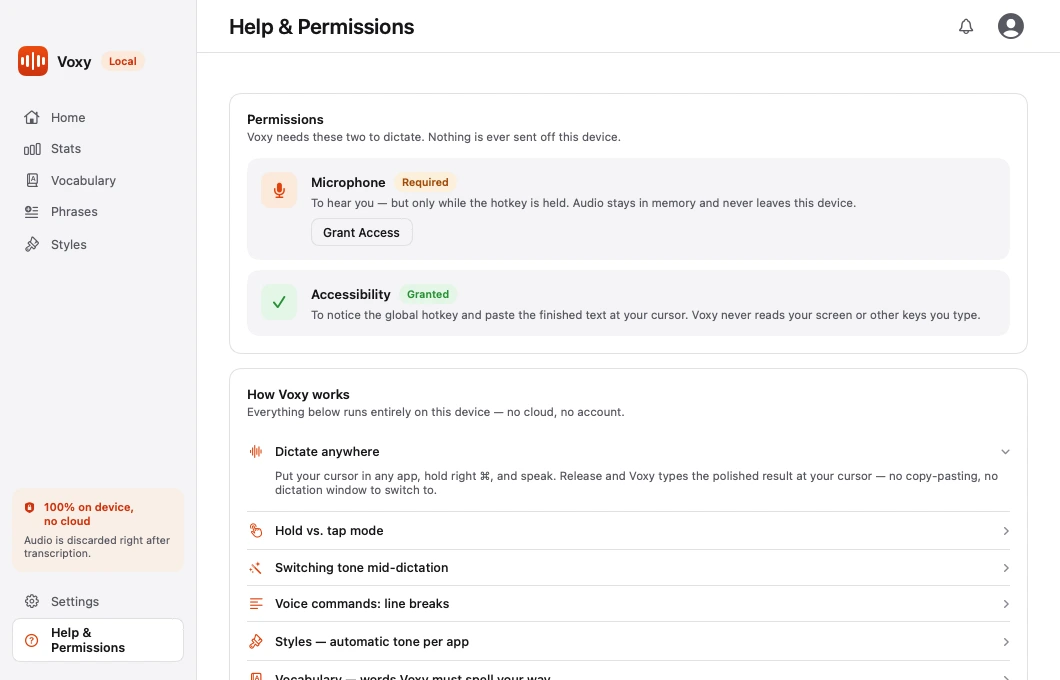
Checking everything at once
Open Voxy and go to Help & Permissions. Each permission shows its current state and a button that takes you straight to the right settings page.
What Voxy never asks for
- Screen recording. Voxy does not read your screen.
- Full disk access. It only writes its own settings files.
- Contacts, calendar, photos, location. None are used.
If something else asks for one of these in Voxy's name, it is not Voxy.