Get started
Install Voxy
Download Voxy and install it on macOS or Windows.
Voxy is a single download with nothing to configure afterwards. There are no background components to approve and no account to create — a licence key is all there is.
Note Voxy for Windows is not out yet. This page describes both platforms so it is right the day it lands.
Install on a Mac
Voxy ships as a signed and notarized disk image, so macOS opens it without a warning.
- Download the disk image from the pricing page.
- Open the downloaded
.dmgfile. - Drag the Voxy icon onto the Applications folder in the same window.
- Eject the disk image.
- Open Applications and double-click Voxy.
Install on Windows
- Download the installer from the download page.
- Run it and follow the prompts.
- Open Voxy from the Start menu.
The installer is code-signed, so Windows SmartScreen lets it through without the "unrecognised app" warning.
Note Voxy uses a low-level keyboard hook to watch for your dictation key. Some antivirus tools treat any such hook as suspicious on principle. The signed installer is what tells them apart — do not run an unsigned copy from anywhere else.
What happens on first run
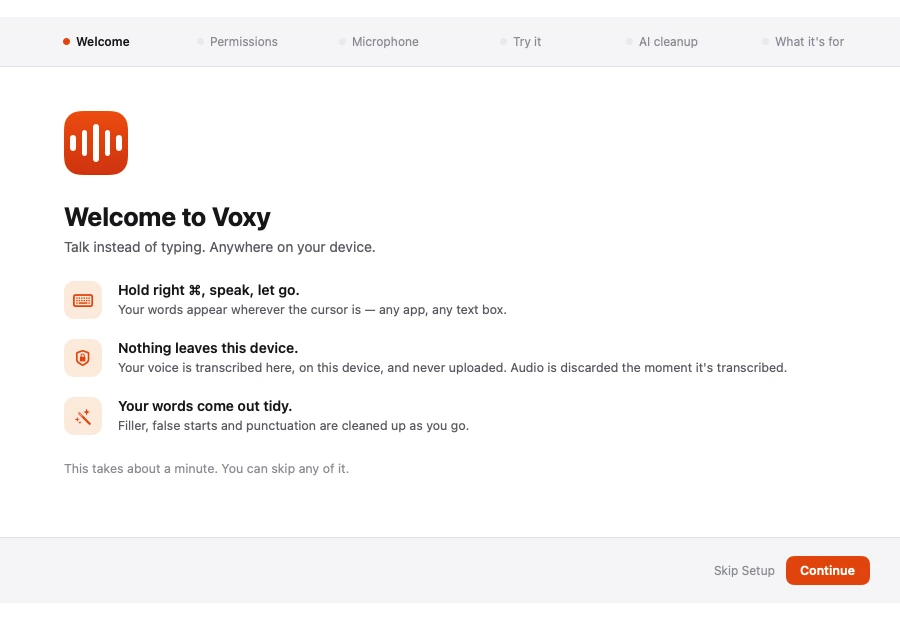
The first launch walks you through a six-step setup:
- A short welcome.
- Microphone permission.
- Permission to type into other apps — see Permissions.
- Picking your dictation key.
- Downloading the speech model.
- A practice dictation.
Note The speech model downloads on first use and is about 0.6 GB. This is the only time Voxy needs the internet in order to dictate. After that it works completely offline.
Where Voxy lives once it is running
| Platform | Where to find it |
|---|---|
| macOS | The menu bar, not the Dock. Double-click Voxy in Applications to open the window |
| Windows | The system tray, near the clock. Open it from the Start menu |
You can also set a keyboard shortcut that opens the main window from anywhere — see General settings.
Keeping it up to date
Voxy checks for a new version on its own and tells you when one is ready. Updates are included for one year with a purchase; see License.
Uninstalling
If Voxy is not for you, Uninstalling lists every file it creates on both platforms, so you can remove all of it.