Your data
Home and history
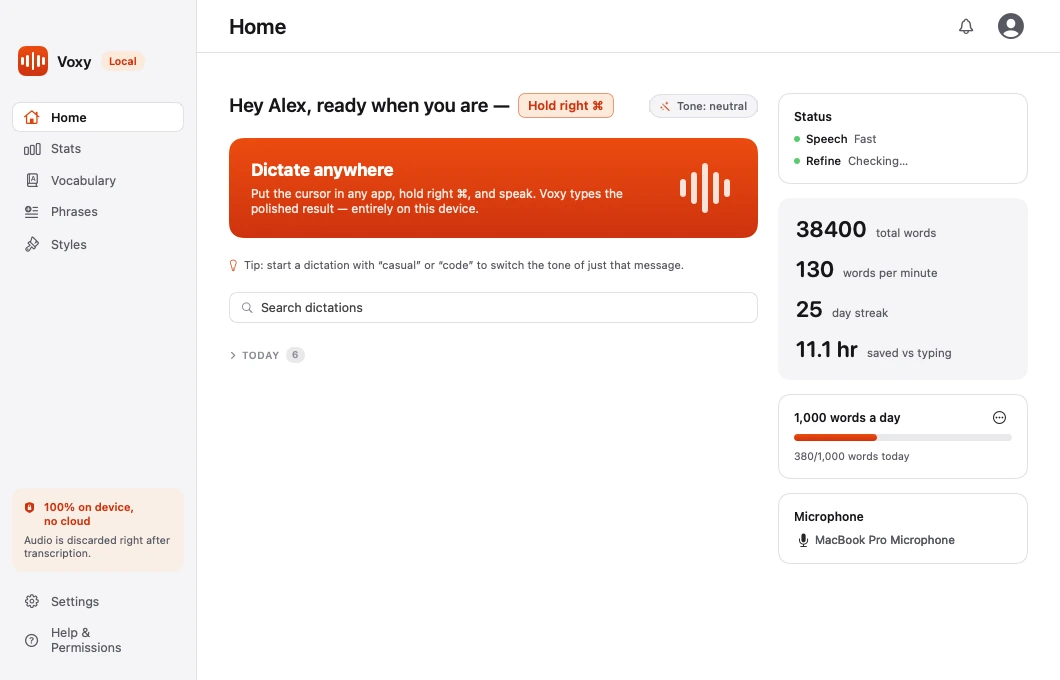
Your recent dictations, grouped by day and searchable, plus quick access to your microphone and daily goal.
Home is the first page in the Voxy window. It shows how Voxy is doing right now and what you have dictated recently.
Recent dictations
Your dictations are listed newest first and grouped by day. Each entry shows the text and which app it went to.
You can:
- Search your full history by what was said or which app it went to.
- Copy any past dictation back to the clipboard.
This is useful when a dictation went into the wrong window, or when you want to reuse something you said earlier.
Pipeline health
Home shows the live state of the two stages that turn speech into text:
- The speech engine — is the model downloaded and ready?
- AI Refine — is Ollama running and is the model loaded?
If either is not ready, Home says so and tells you what to do about it. This is the first place to look when a dictation behaves oddly.
Your daily goal
You can set a daily word goal. Home tracks progress against it, alongside the running totals for today.
Microphone
The sidebar cards on Home let you pick your microphone without opening Settings. Handy when you plug in a headset.
Note If a device is marked (virtual), it usually delivers silence unless another audio app is routing your real microphone into it. Pick a physical microphone for dictation.
Turning history off
History is part of local usage stats. If you turn stats off in Settings → Privacy, dictations stop being recorded. See Privacy.
Nothing here ever leaves your computer either way.